Indra Ganzorig13 May 2021
1. Claim your phone number
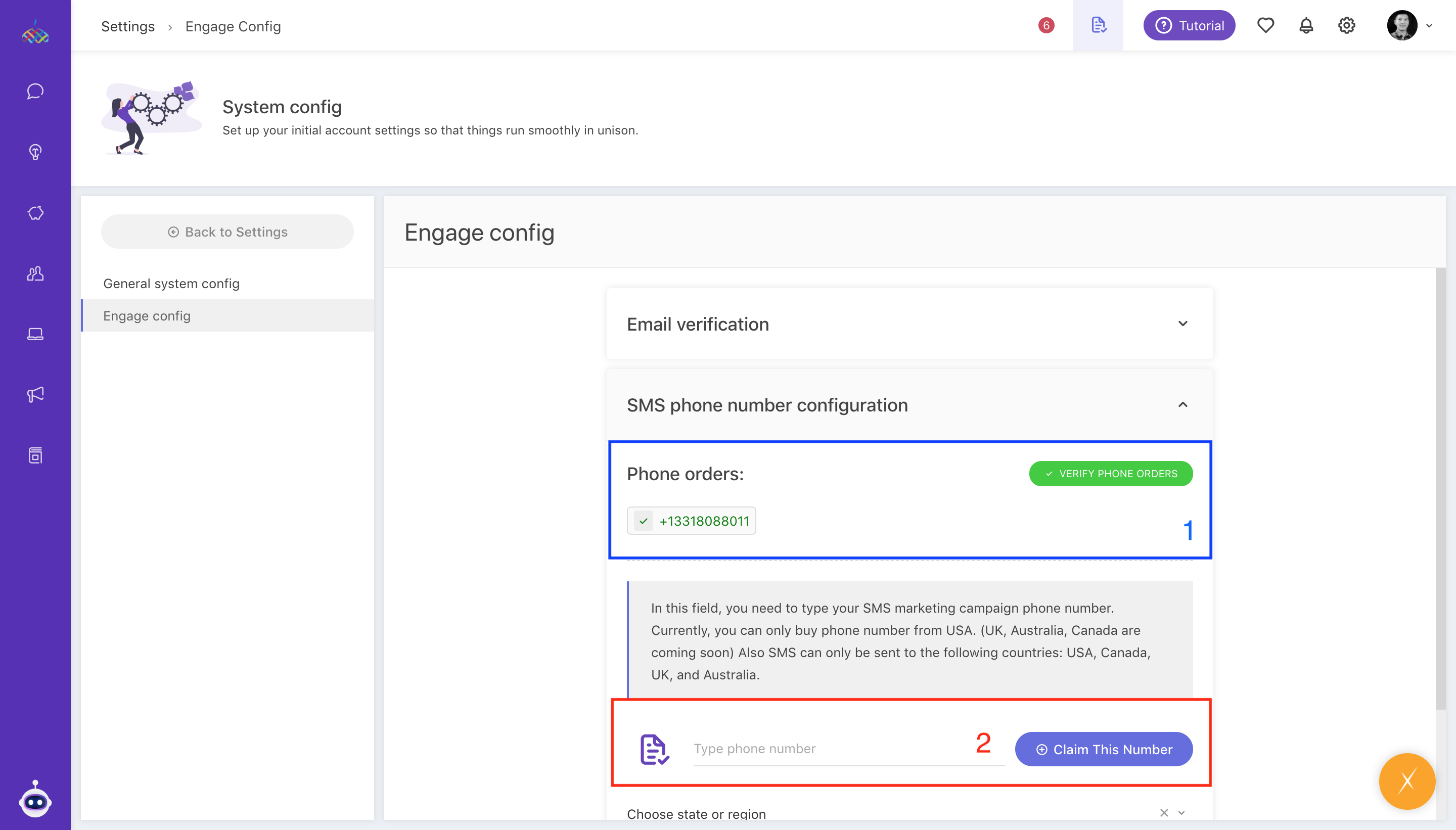
- Section 1 in blue shows the phone number you've claimed. When claiming numbers, it takes some time to become valid. Valid phone numbers are colored green & pending are red. To validate your number, click the Verify phone orders button.
- Section 2 in red shows the phone number form. The phone number must be in e.164 format. You must type in or copy one from the available phone numbers section & click Claim this number button. Click Verify Phone Orders.
- Currently, we offer phone numbers from the USA. These phone numbers can be filtered by states. You just have to choose the state you want from the select box.

2. Create an SMS integration
- Go to Settings/AppStore and click on "Add" in the SMS box.
- Choose the phone number you've claimed in the dropdown menu and associate it with the Brand and Channel:

3. Prepare your contacts
- Make sure you correctly input your customer phone numbers, i.e +13128547124, no spaces, and the plus sign for international calling.
- If you need to bulk update, you can use the import feature to upload the correctly formatted phone numbers.
- To correctly format your phone number in a spreadsheet, use the formula =CONCATENATE("+976", B3). And make sure you copy and paste that column as value only afterward.
- You can choose to import only firstName, lastName, and primaryPhone. The system should recognize the duplicate contacts and just update with the new information.
- Verify your customer phone numbers in the Contact list by clicking "Edit Column":

- Create a segment to filter all contacts with valid phone numbers. This step will be optional in the future, once make some enhancements and revamp the SMS feature):

4. Send your SMS
4.1 Individual SMS
To send individual text messages, go to your Contact Profile and click on the "Send SMS" button:

Or alternatively, you can send a reply as a text message straight from the Team Inbox:

4.2 Bulk SMS
- Go to Engage and create a New Message. Choose from Auto (recurring) or Manual (one-off) message.
- On the first slide, choose SMS as the channel.
- On the second slide, choose the Segment/Tag/Brand (you can choose multiple options within one type.)
- On the last slide, choose the sender. Write an SMS title. When sending SMS to phone numbers outside of the USA, this title text will be shown as the sender. Within the USA, the original number will be shown. Write SMS body. It has 160 characters limit.

How to troubleshoot?
- Check if your phone numbers are correctly inputted. The correct format is e.164 format and looks like this: +13128547124
- Check if the phone number is set us the primary phone number.
- Check if your phone numbers are verified and valid.
;